
Yes, you can export from a DIY solar system without MCS if Octopus accepts you onto its non-MCS export route. You still need DNO registration (G98 or G99), electrical certificates, a smart meter, and usually an export MPAN before payments start. This guide is the Octopus process I used: documents, order of steps, timing, and the failures that slow people down.
This article includes a referral link to Octopus Energy. I earn a referral fee from this link.
Can you export without MCS?
With Octopus, sometimes yes. With almost every other mainstream supplier, no. Standard Smart Export Guarantee (SEG) tariffs expect an MCS certificate number. DIY systems cannot be MCS-certified, so surplus usually goes to the grid unpaid. Octopus has run a non-MCS export route since summer 2023 that can accept DIY builds if you meet its evidence bar.
Before I found that route I looked at MCS for a self-build. My conclusion, which still holds: DIY systems cannot get MCS. MCS certifies products and installers, not homeowner-built systems.
That does not make export automatic. Octopus still wants:
- You as an Octopus supply customer
- A working smart meter that can measure export
- DNO notification or approval (G98 or G99)
- Electrical safety evidence (EIC and Building Regulations compliance for notifiable work)
- A successful application on their non-MCS form, including the processing fee
Octopus is the only mainstream supplier I have seen treat non-MCS DIY export as a real product path. Other suppliers may say no even if your wiring is perfect. Treat this as Octopus-specific, not UK-wide SEG policy. For tariff rates after you are accepted, use the Octopus export tariffs guide.
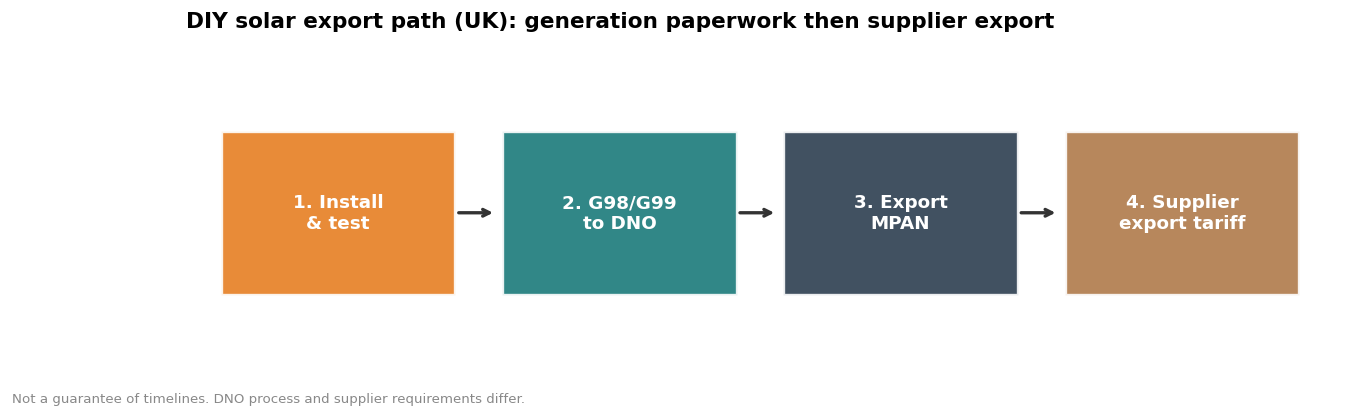
How to register DIY solar with Octopus
Do the DNO work first. Export applications stall when the generation connection is not already documented. My full walkthrough of that paperwork is the homeowner guide to registering DIY solar with the DNO.
- Confirm DNO registration is complete. Keep the G98 acceptance or G99 approval letter. That letter is not an export MPAN; it is proof the network knows about your generation.
- Be an Octopus customer with a smart meter. If you are not on supply, you can switch first. My referral link credits both of us £50 when the switch completes under Octopus’s current referral terms.
- Fill in the non-MCS Outgoing application form. Octopus uses a Typeform-style application: the DIY / non-MCS export form. Provide account details and system details, and accept that this is still described as a beta / trial process.
- Pay the application fee when Octopus emails you. Payment is not on the first form. The non-MCS route fee is £250. If the application fails, Octopus has refunded down to a £100 non-refundable portion in the process I went through; confirm the current fee wording when you apply.
- Upload the documents Octopus asks for. Typically the DNO letter, Electrical Installation Certificate (EIC), and Building Regulations compliance evidence. Flexi-Orb can be accepted by Octopus in some cases, but it is not a universal MCS substitute for other suppliers.
- Wait for the export MPAN to be created. Octopus requests this from the DNO on your behalf after documents clear. Smart-meter export readings then drive the tariff.
- Choose or confirm the export tariff. Options include Outgoing Fixed, Outgoing Agile, Outgoing Fixed Lite (often for Go customers), and Intelligent Octopus Flux if you have compatible storage. Check live rates before you commit.
Why bother? A system built for self-consumption still exports on bright days. In my case, automating the inverter with Solar Assistant more than doubled annual export from 1,766 kWh to 3,914 kWh. Export income is not the main reason I built the system, but it stops surplus becoming free electricity for the grid.
| Tariff type | Rate shape | Who it suits |
|---|---|---|
| Outgoing Fixed | Fixed p/kWh (check current rate; historically around 12p) | Simple systems wanting predictability |
| Outgoing Fixed Lite | Lower fixed export (historically around 8p for Go customers) | Octopus Go households balancing cheap import and modest export |
| Outgoing Agile | Half-hourly wholesale-linked | Flexible households, often with storage |
| Intelligent Octopus Flux | Time-banded import and export with evening peaks | Compatible battery systems that can shift charge and discharge |
Export MPAN vs DNO letter
These are different documents for different jobs. Mixing them up is the most common reason people think “I already registered” when export still cannot start.
| DNO G98/G99 letter | Export MPAN | |
|---|---|---|
| What it is | Network permission or notification for connecting generation | A metering point identifier for exported energy |
| Who issues it | Your Distribution Network Operator | Created via the DNO after the supplier requests it |
| When you need it | Before or shortly after install, depending on G98 vs G99 | Before export payments can settle properly |
| Does it pay you? | No. It makes the connection legitimate. | No by itself. Your supplier tariff pays you against smart-meter export data tied to that MPAN. |
| Who holds the process for DIY Octopus? | You (see the DNO guide) | Octopus requests it after your application and documents clear |
Your import MPAN is the supply number on your bill. An export MPAN is a separate metering identifier for generation leaving the property. Octopus cannot credit an export tariff cleanly until that export side exists and the smart meter is reading export.
DNO contact details differ by postcode. As one example only, UK Power Networks publishes generation connection guidance at its distributed energy resources page, and lists G98_G99@ukpowernetworks.co.uk and 0203 324 1460 for G98/G99 queries. Your DNO may differ. Use the operator that matches your MPAN region, not UKPN by default.
Documents checklist
Have these ready before you open the Octopus form. Incomplete packs are the slow path.
- DNO confirmation: G98 notification acceptance or G99 approval letter, matching the inverter capacity you actually connected.
- Electrical Installation Certificate (EIC): covering the notifiable circuit work for the inverter connection.
- Building Regulations compliance evidence: for example a NAPIT (or equivalent competent-person scheme) Building Regulations Compliance Certificate for the electrical work.
- System basics: inverter make and model, AC capacity, panel capacity if asked, and your import account number.
- Smart meter confirmation: export-capable smart meter on supply with Octopus.
- Optional: Flexi-Orb certificate if you have one. Useful for Octopus in some battery cases; not a drop-in MCS replacement for other SEG providers.
Connecting a solar inverter needs a dedicated circuit. That is why a competent person has to do the notifiable consumer-unit work and issue the certificates Octopus will ask for. Safety is not optional paperwork dressing.
How long it takes
There is no guaranteed SLA. My own application took about three weeks from the form to confirmation that I was on Outgoing Fixed. That is one homeowner timeline, not a promise.
Operational expectation, dated July 2026: after documents are accepted, the export MPAN step can still take weeks. Octopus support has indicated that export MPAN creation often sits with the DNO side of the process and is not instant once you hit “submit”. Plan for multi-week waits even when your certificates are clean. Do not assume tariff credits start the day you pay the fee.
- Form to payment request: often a few days
- Document review: days to a couple of weeks if something is missing
- Export MPAN creation: commonly weeks after documents clear
- Tariff go-live: after MPAN and smart-meter export data line up
Common failures
- No DNO letter yet. Applying for export before G98/G99 is finished wastes the fee cycle. Finish network registration first.
- Confusing the DNO letter with an export MPAN. One does not replace the other.
- Missing Building Regulations evidence. An EIC alone may not be enough if the work was notifiable.
- Inverter capacity mismatch. Documents that describe a different AC capacity from what you declared to the DNO invite rejection or rework.
- No smart meter, or a meter that is not exporting readings. Payments need measured export data.
- Expecting MCS-style SEG from another supplier. Outside Octopus, “no MCS, no money” is still the normal rule.
- Treating the route as guaranteed. Octopus still frames the non-MCS path as a beta/trial process. Read the form warning before you pay.

Why export still matters on a DIY system
Many DIY systems start as self-consumption builds. That already cuts bills. Export is the second cut: it monetises surplus after the house and battery have taken what they need. If you are designing for winter arbitrage as well, read battery storage without solar. For hardware choices that affect how much you can export, use the inverter selection guide and overpaneling.
I built to reduce bills and hedge price risk, not to chase export as a business. Export income still improved the total return once the system was oversized for bright days. The fee and the paperwork are only worth it if your surplus is real and you can supply clean certificates.
Next steps: finish DNO registration if that is still open, gather the documents checklist above, then open the Octopus non-MCS form when the pack is complete. For tariff choice after approval, use the export tariff comparison.
