Solar Assistant transforms a Sunsynk, Deye, or Growatt inverter from a cloud-dependent box into a fully automated solar export machine. If you’re on Octopus Go and want to force every spare watt of solar to the grid during the day while charging cheaply overnight, this is the software that makes it happen. The native inverter apps refresh every five minutes and offer rigid menus with no way to schedule charge or discharge current limits throughout the day. Solar Assistant connects locally over RS485, gives you real-time data, and lets you write automation rules that overwrite inverter settings on the fly.
I run a Sunsynk ECCO 3.6kW on an Octopus Go tariff. In this guide I’ll show you exactly how I use three SolarAssistant rules to force grid export during the day and eliminate battery waste heat overnight. These rules have measurably increased my export credits and reduced the heat my batteries throw off during cheap-rate hours. If you’re on Octopus Go, Flux, Intelligent Go, or any time-of-use tariff, this approach applies directly.
Why Solar Assistant Beats the Sunsynk Native App
Whether you’re using the Sunsynk app, Deye’s SolarMan, or Growatt’s ShinePhone, the story is the same: a basic Time of Use (TOU) timer, a charging window, and a target SOC. That’s about it. There’s no way to schedule different Max Charge Current or Max Discharge Current values at different times of day. You can’t say “charge at 30A overnight but only allow 2A during the day.” You certainly can’t build conditional logic around tariff windows.
The cloud interfaces all share the same weakness: latency and reliability. Commands go from your phone to servers in China (Sunsynk, Deye, Growatt) and back to your inverter. If their server is slow or offline, you’re stuck. Solar Assistant operates entirely locally over RS485. No cloud dependency, no 5-minute refresh lag.
This guide assumes you already have SolarAssistant connected to your Sunsynk via RS485. If you need first-time hardware, cable and commissioning steps, start with the Solar Assistant setup guide for Sunsynk and Deye. If you’re still fighting CRC communication errors, see my dedicated guide on fixing the Solar Assistant CRC error with a single CAT5 cable.
Setting Up the SolarAssistant Actions and Rule Table
Once SolarAssistant is connected and reading your inverter, head to the Actions tab. This is where the magic happens. Each rule consists of a trigger (typically a time-based schedule), a target register on the inverter (like Max Charge Current), and a value to write.
Rules execute in order from top to bottom. If two rules target the same register at the same time, the last one wins. Keep this in mind when troubleshooting unexpected behaviour.
The Foundation: Your Work Mode Timer
Before writing any automation rules, you need to configure the Sunsynk’s own Work Mode timer. This sets the baseline: when the inverter is allowed to charge from the grid, at what wattage, and to what SOC target.
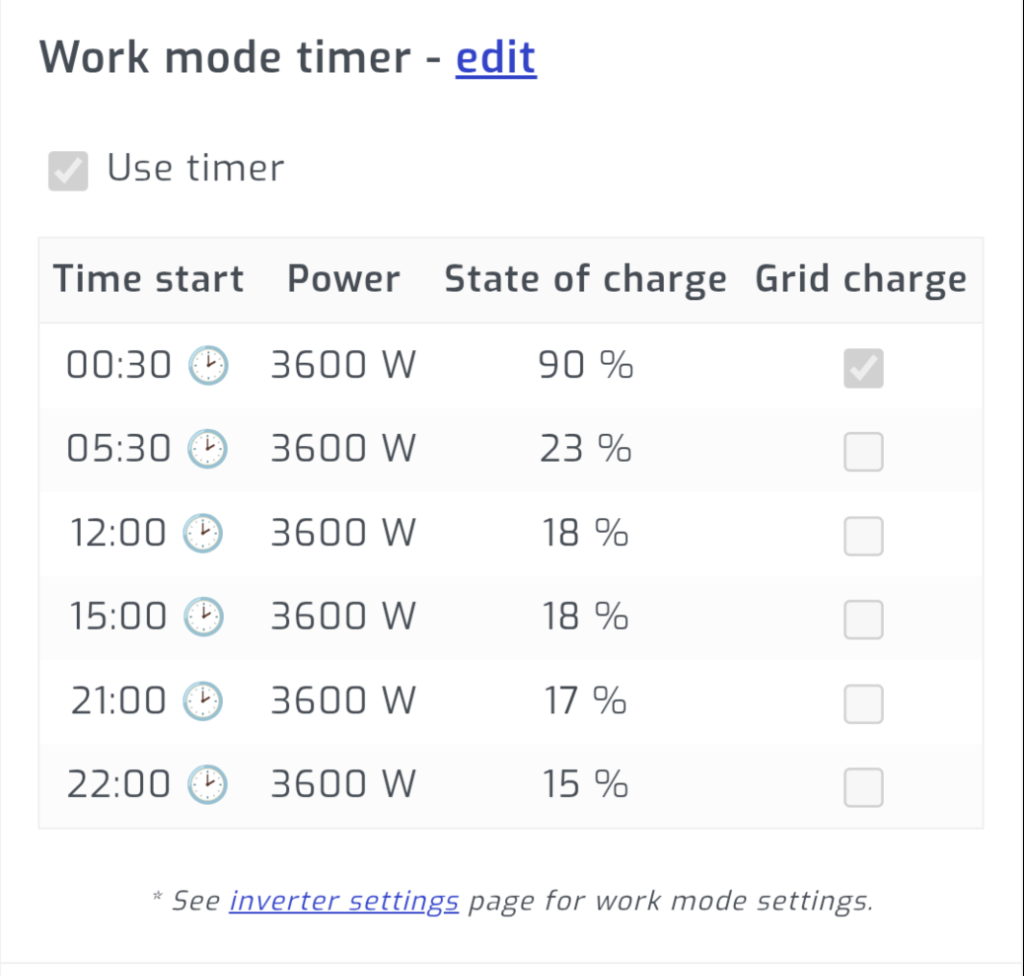
On Octopus Go, our cheap window is 00:30 to 05:30. I set the Work Mode timer to enable grid charging during that window at 3600W, pushing the battery to 90% SOC. Outside that window, grid charging is disabled. This is the foundation that the SolarAssistant rules build on top of.
How rules interact with the Work Mode Timer: The Work Mode Timer controls whether grid charging is on or off. The SolarAssistant rules control how much current can flow in each direction. They work together. The timer says “charge from grid now,” and the rules say “but only at this many amps.” Neither overrides the other; they layer.
Force Solar Export: Daytime Max Charge Current at 2A
This is the rule that makes the biggest difference to our export income. Once the battery is topped up from cheap overnight grid power, the last thing we want is daytime solar trickling into an already-full battery. We want that solar exported to the grid where Octopus pays us for it.
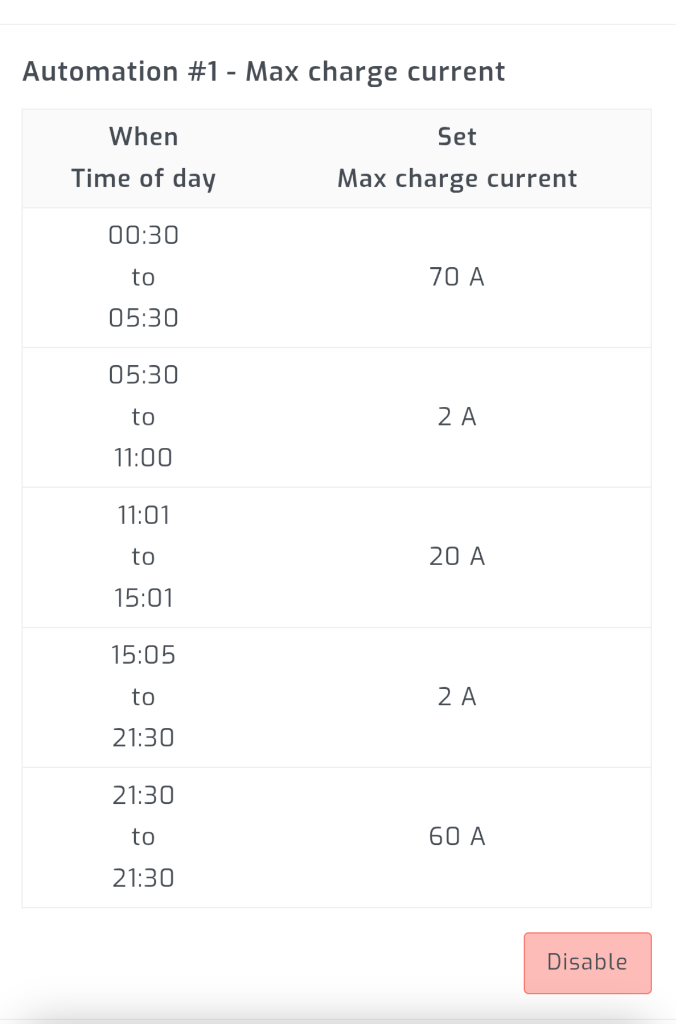
The rule is simple: between 05:30 and 21:30, set Max Charge Current to 2A. With the battery effectively blocked from accepting charge during sunlight hours, the Sunsynk pushes all surplus solar straight to the grid. In summer, this means nearly every watt of generation beyond house load goes to export.
Why 2A and not 0A? This is critical. I deliberately leave a small trickle rather than setting it to zero. Read the section below on SolarAssistant crashes to understand why.
At 21:30, a second rule restores the Max Charge Current to the full 30A, ready for the overnight grid charge window.
Real UK Solar Export Data: 2024 vs 2025 Results
Theory is one thing. Here’s what actually happened to my grid export after implementing these SolarAssistant rules, combined with expanding my solar array.
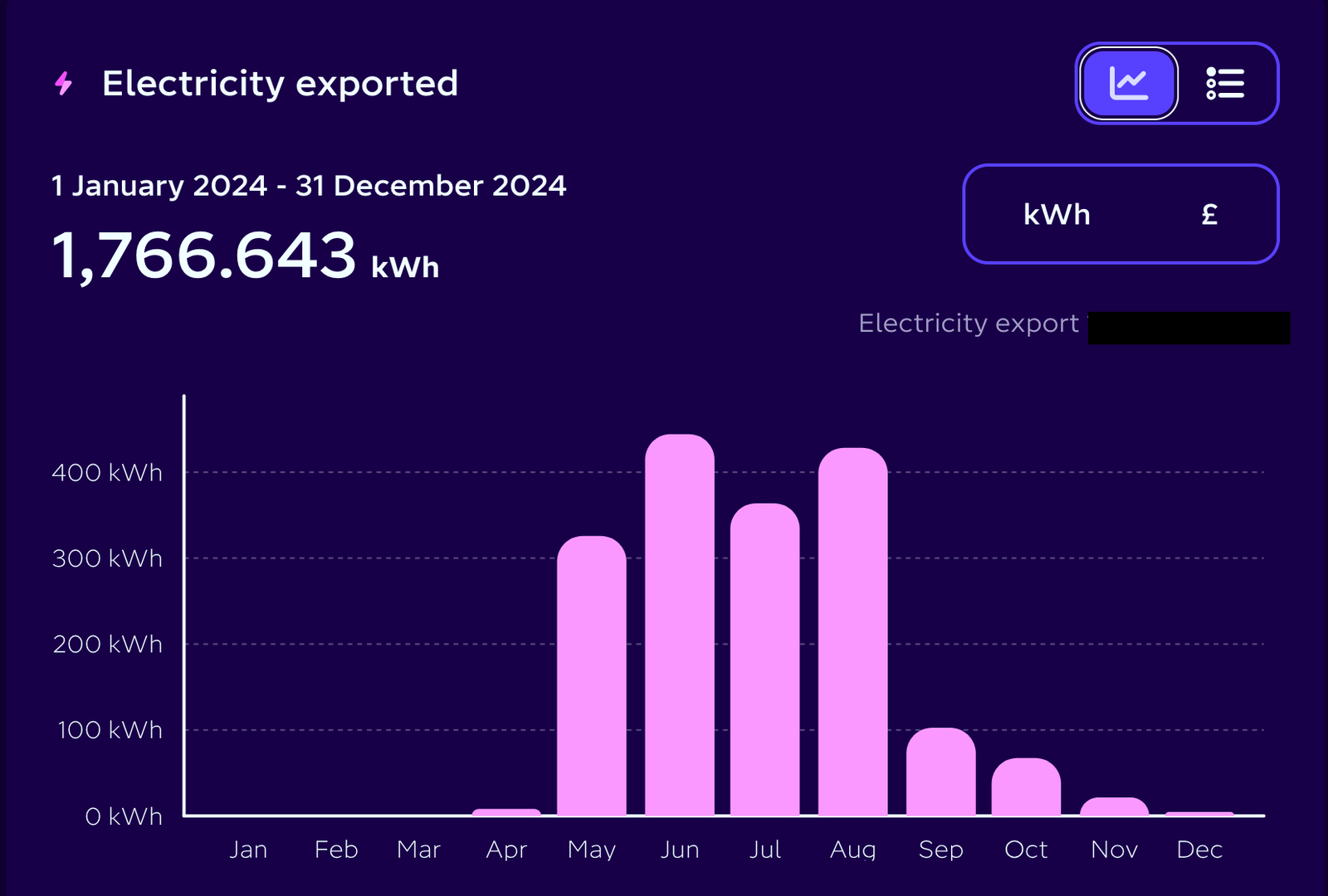
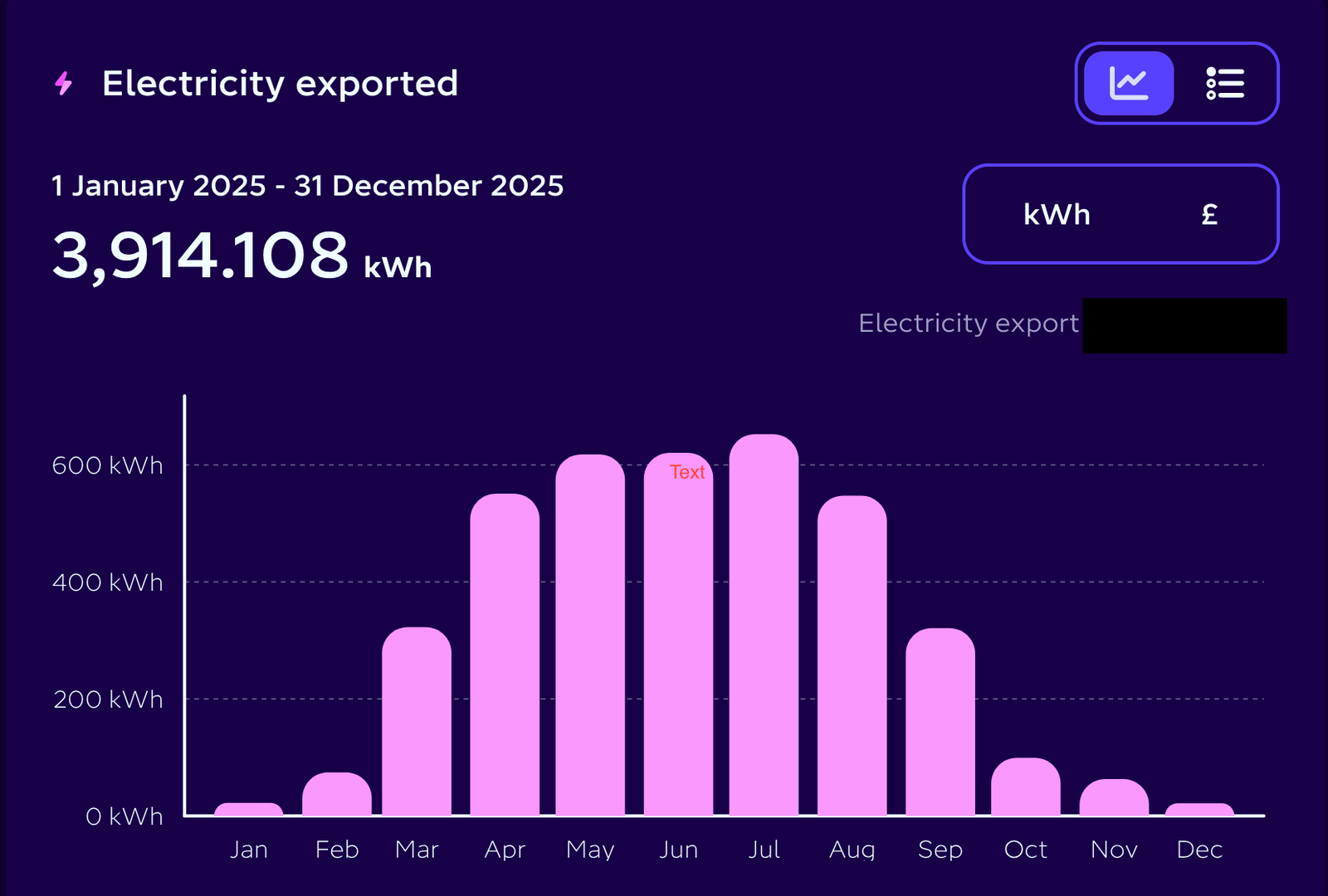
The year-on-year difference is stark. In 2024, I exported 1,766 kWh across the whole year. In 2025, that jumped to 3,914 kWh. That’s more than double.
Now, this isn’t a perfectly controlled experiment. Two important caveats:
- I nearly doubled my PV capacity in May 2024 with the addition of a solar gazebo. So from May 2024 onwards, the generation potential was significantly higher than the first four months.
- I switched to Octopus Go in November 2024 and started fully charging the battery overnight from cheap grid power at that point. The SolarAssistant automation rules went live at the same time. Before that, the battery was charging from solar during the day, which meant less surplus available for export.
So we don’t have a clean like-for-like comparison. But look at the months where both years had the same PV capacity and roughly the same sunshine. July 2024: 363 kWh exported. July 2025: 652 kWh. That’s an 80% increase in export from the same panels, same inverter, same house. The difference is the automation rules forcing every spare watt to the grid instead of letting it trickle into an already-full battery.
At current Octopus export rates, that extra 2,148 kWh of export in 2025 translates to roughly an additional £320 in export credits over the year. That’s real money from rules that took 10 minutes to set up.
Overnight Grid Charge Protection: Max Discharge Current at 1A
This rule solved a problem that had been silently costing me energy for months. I run one Fogstar rack with three 5.12 kWh packs in parallel, connected to the Sunsynk. The rack reports one combined state of charge to the inverter. The rules work identically whether you have one battery or four. Overnight, once the battery reached the grid charge target, the inverter let the house draw a little from the battery. Then it charged the battery again, over and over. This is micro-cycling: draw a little, stop, charge a little, stop, repeat. Over a full night, this generates noticeable waste heat from the batteries and burns through energy that should have stayed stored.
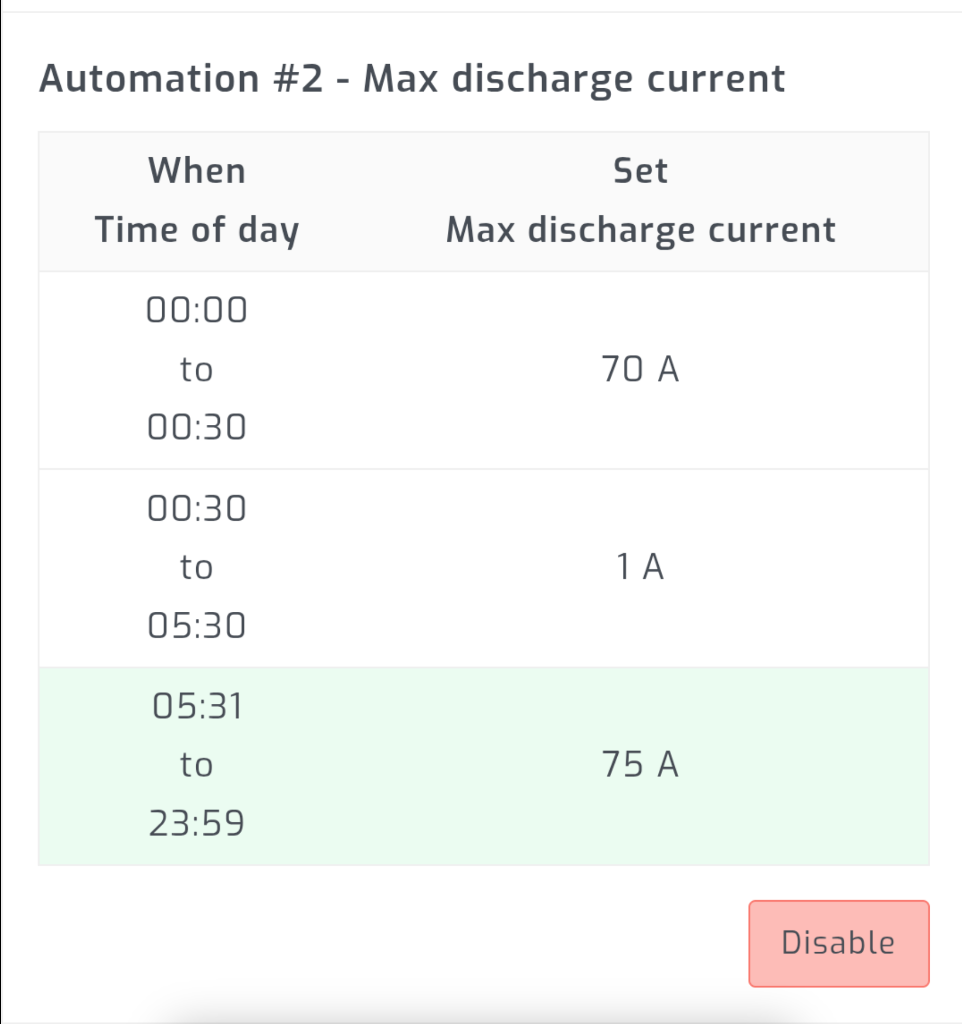
The fix: cap Max Discharge Current to 1A between 00:30 and 05:30. During the cheap Octopus Go window, the battery can’t discharge. The house pulls entirely from the grid at the cheap rate. The batteries sit undisturbed, charging steadily to 90%.
The results were immediate. Battery temperatures dropped. The SolarAssistant graphs went from a jagged mess of micro-cycles to clean, smooth charging curves. I estimate this single rule saves 0.5-1 kWh per night that was previously lost to heat.
There’s a longer-term benefit too. I used to run a single rack with two batteries inside it, and they experienced noticeable SoC drift. One battery was consistently more “responsive” than the other. It would charge first and discharge first, because of a tiny natural voltage difference between the cells in each pack. Over weeks, especially through cloudy stretches where neither pack fully topped up from solar, that imbalance compounded. The more active battery drifted further and further from the other in state of charge. This is SOC runaway, and it’s a real problem in parallel battery setups that nobody warns you about. In September 2024, the third pack from my original bundle joined the same rack. Since adding these rules, the problem has completely disappeared. I now run one rack with three batteries inside it, and the SoC stays consistent across all of them. By capping discharge overnight and forcing a full grid charge to 90% every night, every battery starts each day at the same level.
When SolarAssistant Crashes: Why You Never Set Amps to Zero
Here’s something the documentation doesn’t warn you about, and I learned the hard way. SolarAssistant crashes sometimes. It’s not frequent, but it happens. The Raspberry Pi might lose power briefly, the process might hang, or an update might go wrong.
When SolarAssistant crashes, your automation rules stop executing. But the last value written to the inverter stays. If your last rule set Max Charge Current to 0A, your battery will sit there refusing to charge until you notice and manually intervene. I’ve had entire days where my battery barely charged because SolarAssistant had gone down overnight and the 0A charge limit was still in effect from the previous day’s export rule.
The fix is simple: never set charge or discharge amps to zero. Always leave a small safety margin. I use 2A for charge and 1A for discharge. If SolarAssistant goes down, the inverter can still trickle charge or discharge at a low rate rather than being completely blocked. It’s not ideal, but it’s far better than discovering at 6pm that your battery is at 15% because the automation was stuck.
Solar Assistant has a built-in fix for this: the Maintenance page includes a scheduled reboot option. Set it to weekly and the Raspberry Pi will automatically restart on a regular cycle, clearing any hung processes and restoring your automation rules to their correct state. I haven’t been using this until now, but after losing days of charging to a silent crash, I’ll be enabling it going forward.
Beyond scheduled reboots, consider setting up a Home Assistant alert that fires if MQTT data stops arriving. If Solar Assistant goes silent for more than 10 minutes, you’ll know about it before your battery pays the price.
Keep Solar Assistant Updated
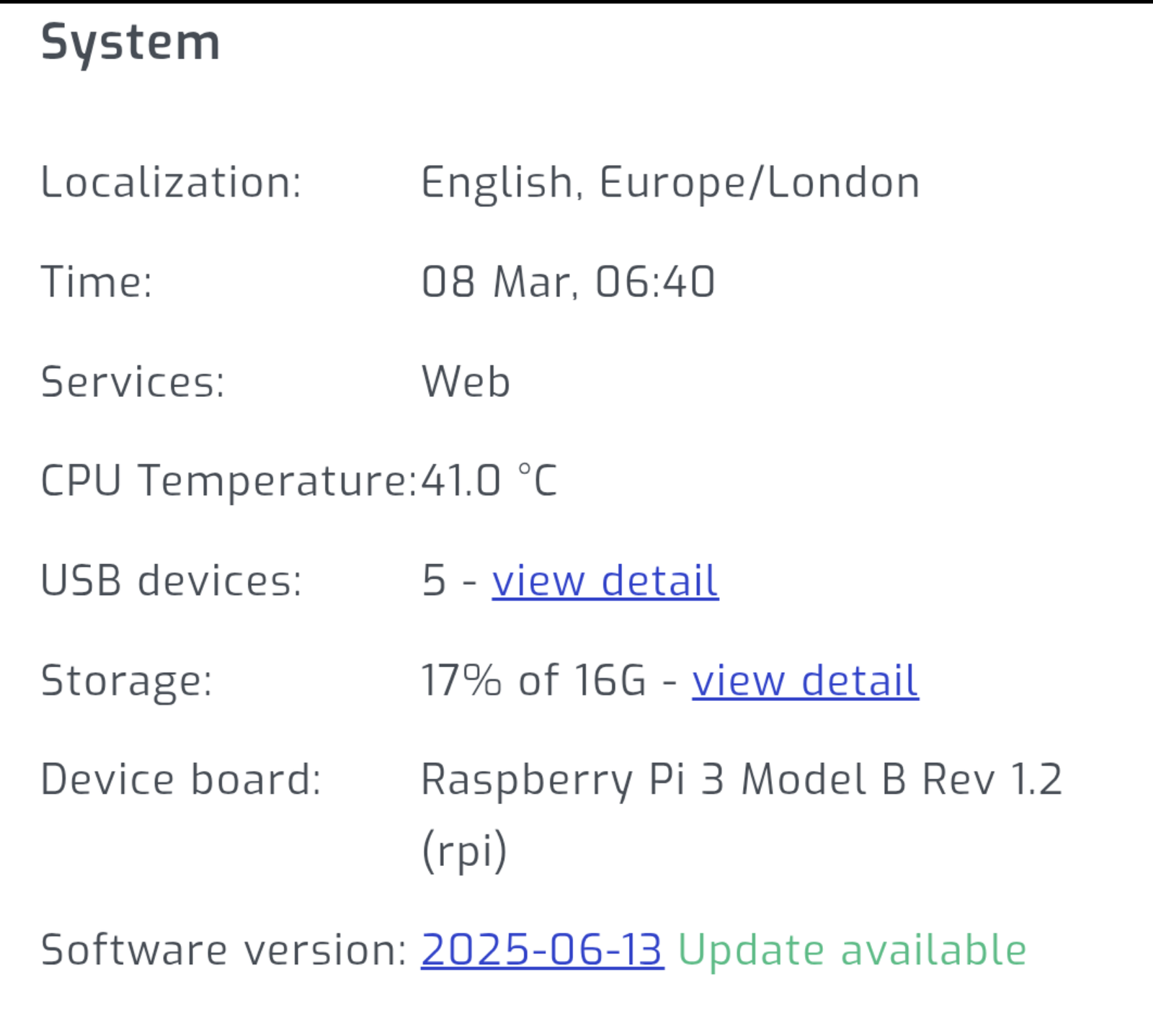
Solar Assistant has a built-in updater, but it’s easy to miss. Check the System page at the bottom of the sidebar. If an update is available, you’ll see a green “Update available” link next to the software version. It took me a while to discover this existed. Updates regularly add new inverter register support, stability fixes, and improved automation features. The rule table automations themselves have been refined over several releases. Keeping current also means better compatibility if you’re bridging into Home Assistant via MQTT.
Troubleshooting Common Issues
CRC Errors and RS485 Communication Failures
The most common problem when first connecting SolarAssistant to a Sunsynk. Almost always caused by signal interference between the CAN (battery) and RS485 (SolarAssistant) protocols sharing the same RJ45 port. See my dedicated CRC error fix guide for the full solution.
Rules Not Applying or Applying Out of Order
SolarAssistant processes rules top to bottom. If you have overlapping time windows targeting the same register, the last rule to execute wins. Check your rule order carefully. Also verify that SolarAssistant has write access enabled for your inverter model. Some setups default to read-only.
Inverter Not Responding to Changes
Try rebooting the inverter (turn off the DC isolator, wait 30 seconds, turn it back on). Some Sunsynk firmware versions occasionally lock up the RS485 interface after extended operation. If the problem recurs frequently, check with your installer about firmware updates. Also confirm the baud rate in SolarAssistant matches the inverter’s configured rate (9600 is standard for most Sunsynk models).
Home Assistant Solar Integration via MQTT
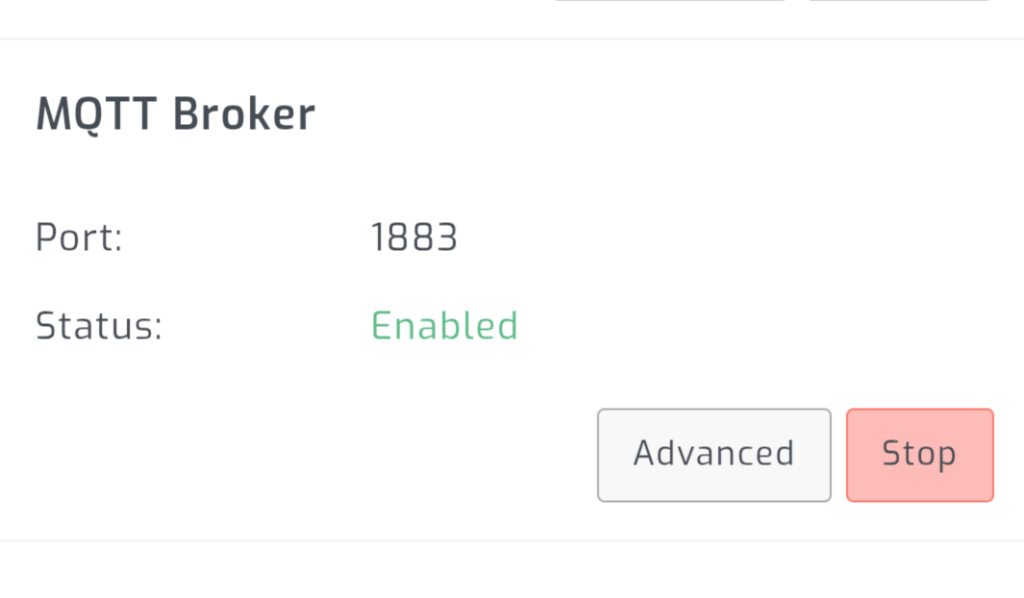
Solar Assistant’s built-in MQTT broker is what turns a simple monitoring tool into a full home assistant solar automation platform. Whether you’re running a Sunsynk, Growatt, or Deye, enable the broker, point Home Assistant at it, and suddenly every inverter register is available as an entity in HA. You can build dashboards combining your Fogstar battery levels, solar yield, grid import/export, and house load in one place.
But the real power is in what you can trigger from HA:
- Octopus Agile pricing: Use the Octopus API integration to read half-hourly prices and dynamically adjust charge windows. When grid electricity drops below your export rate, charge the battery. When it spikes, force full export. This is the natural next step beyond fixed Octopus Go windows.
- Solar forecast integration: Connect Forecast.Solar via Home Assistant to adjust overnight charging based on tomorrow’s expected generation. On a sunny day forecast, charge the battery to only 40% overnight. On a grey day, charge to 100%.
- EV and immersion heater diversion: When solar surplus exceeds a threshold, trigger an EV charger or immersion heater via a smart plug. Use the solar before it hits the grid at a lower export rate.
- Octopus Flux peak export dump: If you’re on Flux, the peak export window (16:00-19:00) pays a premium. Build an HA automation that forces maximum battery discharge during that window for maximum revenue.
By bringing the data into Home Assistant, you aren’t just monitoring. You can trigger smart home events based on solar surplus, pushing your energy utilisation to the absolute maximum.
Octopus Go, Flux, and Agile: Adapting Rules for Your Tariff
The rules I’ve described are tuned for Octopus Go, but the principle works across most time-of-use tariffs. Here’s how to adapt:
- Octopus Go: Exactly as described above. Cheap window 00:30-05:30, force export during the day, cap discharge overnight.
- Octopus Intelligent Go: Same cheap window structure, but the app may extend cheap slots for EV charging. Your SolarAssistant rules work alongside this. Just be aware that Intelligent Go’s dynamic slots won’t be visible to SolarAssistant unless you pull them via Home Assistant.
- Octopus Flux: Three-rate tariff with a premium export window (16:00-19:00). Add a rule to maximise discharge during that window. Adjust the daytime charge limit to allow some battery charging before the peak export dump.
- Octopus Agile: Half-hourly variable pricing needs Home Assistant and the Octopus API. SolarAssistant rules alone are too static for Agile. Use HA automations to write charge/discharge values dynamically based on price thresholds.
- Economy 7 / Economy 10: Fixed overnight cheap windows. Adapt the charge window times and apply the same discharge cap logic.
Frequently Asked Questions
Will SolarAssistant automation rules void my Sunsynk warranty?
No. SolarAssistant writes to the same registers that the Sunsynk app and on-screen menus use. You’re changing settings that Sunsynk designed to be user-configurable. There’s no firmware modification or hardware alteration involved. That said, if you set values outside the inverter’s rated specifications (which SolarAssistant shouldn’t allow), that’s on you.
Do these rules work with multiple battery banks?
Yes, and they’re arguably more important with multiple batteries. The overnight discharge cap rule stops the micro-cycling I describe above. It also helped keep my packs at the same state of charge. I run three Fogstar packs in parallel in one rack. The rules work identically whether you have one battery or four.
How do I undo or disable the rules?
Delete or disable the rules in SolarAssistant’s Actions tab, then manually set the Max Charge Current and Max Discharge Current back to their defaults through the Sunsynk app or SolarAssistant’s manual configuration panel. The inverter will immediately accept the new values.
Does this work with Deye or other rebadged Sunsynk inverters?
Deye inverters share the same Modbus register map as Sunsynk, so the same rules work directly. Deye is increasingly popular in the UK and Solar Assistant treats it as a first-class supported platform. Growatt inverters also work with Solar Assistant using the same automation approach described here. Other rebadged models (like some Turbo Energy units) may differ. Check Solar Assistant’s compatibility list for your specific model.
Can I use SolarAssistant rules without Home Assistant?
Absolutely. The three core rules in this guide use SolarAssistant’s built-in Actions tab only. Home Assistant is needed for the advanced stuff: dynamic pricing, solar forecasting, and smart device triggers. Start with SolarAssistant rules alone and add HA when you want more.
Does Solar Assistant work with Growatt, Deye, or other inverters?
Yes. Solar Assistant supports Growatt, Deye, Victron, Solis, and several other brands. Growatt and Deye share a very similar Modbus register map to Sunsynk, so the automation rules in this guide translate almost directly. The Actions tab works identically: set a time window, pick the register (Max Charge Current, Max Discharge Current, etc.), and write a value. If you’re integrating Growatt or Deye with Home Assistant via MQTT, Solar Assistant is the bridge that makes it seamless. Check the Solar Assistant supported hardware list for your specific model.
Wrapping Up
Getting your Sunsynk off the native cloud and onto SolarAssistant is the single highest-value upgrade you can make to a DIY solar installation. Three simple rules give you forced grid export during the day, clean overnight charging without waste heat, and a crash-safe margin that prevents automation failures from costing you a full day’s charging.
Start with the rules here, verify they work on your tariff windows, and then look at layering Home Assistant on top for dynamic pricing and solar forecasting. The foundation is solid either way.
