
If you run a local AI server, the honest answer to “UPS or home battery?” is: a UPS first, and a home battery as the second layer if you want hours of runtime instead of minutes. The UPS guarantees your machine rides through the first milliseconds of a power cut and can shut everything down cleanly if nothing else saves it. The battery, wired to your hybrid inverter’s LOAD port, is what keeps the rig computing through a two-hour outage. Neither does the other’s job.
That ordering matters because it is the reverse of what battery marketing implies. I run a Sunsynk hybrid inverter and a Fogstar battery at home, and I would still not put an inference server on the backed-up circuit without a UPS between them. The rest of this article is the numbers behind that sentence.
Why you need two layers, not one
A power cut is two separate problems.
The first problem lasts milliseconds. When the grid drops, something has to keep the voltage up before your power supply’s capacitors run dry. The ATX 3.0 specification requires a PSU to hold its output for at least 17ms at maximum continuous load (Intel ATX 3.0 design guide). A UPS is built for exactly this window: line-interactive units transfer in a few milliseconds, and online double-conversion units never transfer at all.
The second problem lasts hours. Once something has caught the load, the question becomes how long it can carry it. A consumer UPS carries a 400W rig for minutes. A home battery carries it for a day or more. But the battery’s backup output is not designed as a guaranteed no-break supply, and no mainstream manufacturer will promise you it is: the datasheets are conspicuously silent on transfer time, which we will get to.
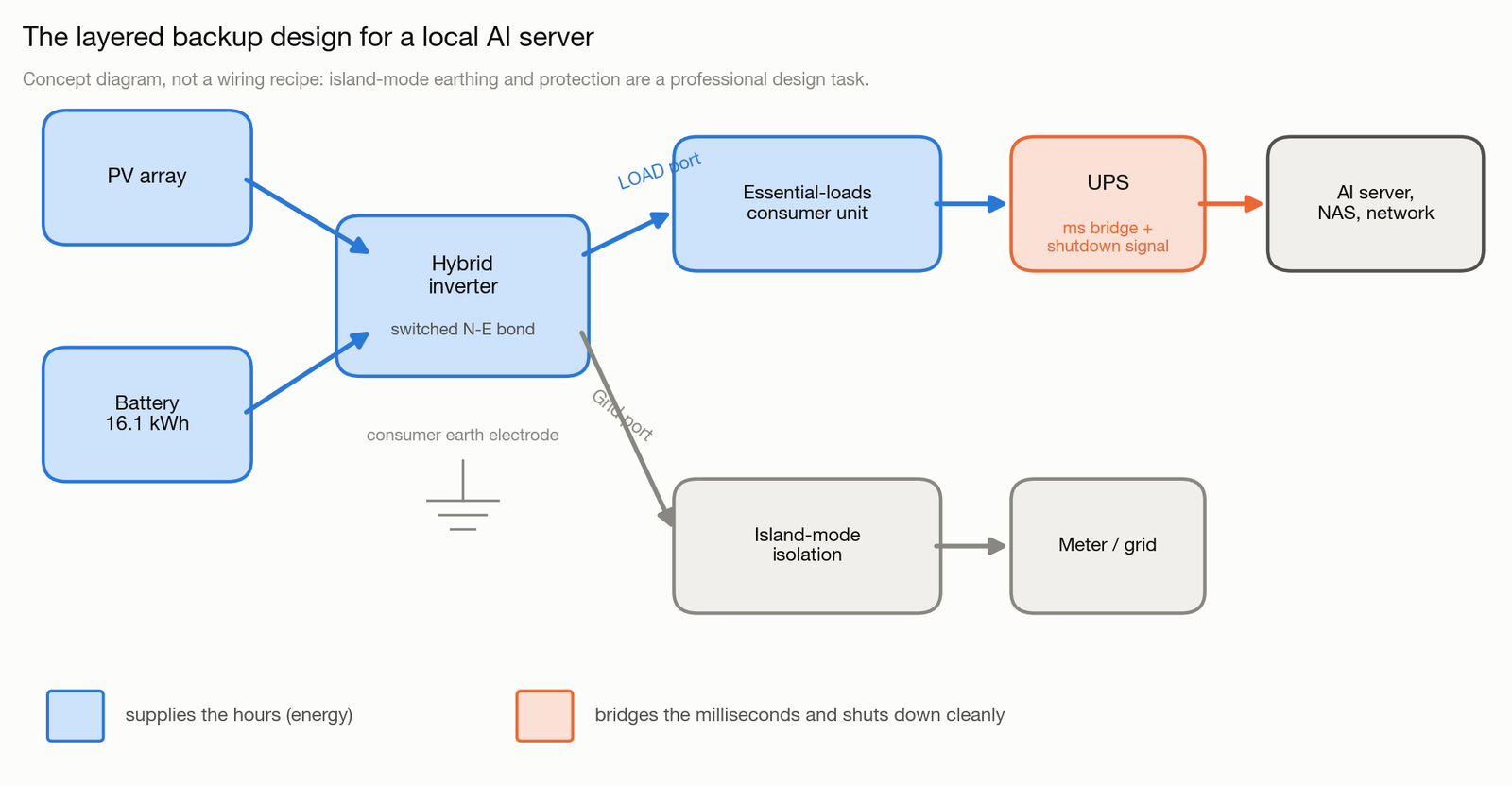
So the layered design is: hybrid inverter and battery feed an essential-loads circuit for duration, and a UPS sits between that circuit and the server for the transition, for power conditioning, and for automated shutdown when everything else has failed. The UPS also protects you from the inverter’s own restarts, firmware updates and trips, which a battery-only design leaves exposed.
One terminology note before the detail, because three different words describe this. On a Sunsynk inverter the physical output is called the LOAD port: a separate AC terminal for essential loads, distinct from the grid connection. GivEnergy calls the equivalent function EPS, Emergency Power Supply. Some products also advertise a “UPS mode”. These are manufacturer mode names, not performance guarantees. A port labelled LOAD or a mode labelled UPS tells you what it is for, not how fast it switches.
What a power cut actually costs you
It depends on the workload, and it is worth being precise, because this audience will be. The popular horror story (everything corrupted, all context gone) overstates some risks and understates others.
| Workload | What you can lose | What normally survives | Non-electrical mitigation |
|---|---|---|---|
| Interactive inference (Ollama, LM Studio) | The generation in flight | Model weights (read-only on disk), chat history if your client persists it | Client-side session persistence |
| Agentic coding (OpenClaw against a local model) | The agent’s in-memory plan and context, any incomplete multi-file edit set | Files already written, everything committed to Git | Frequent commits, atomic-write tools, checkpointed plans |
| Fine-tuning or training | Everything since the last checkpoint | Earlier checkpoints | Checkpoint every N steps |
| NAS, VMs, databases | In-flight writes, volatile caches | Journalled or copy-on-write state | UPS shutdown signalling, sync policy, CoW filesystem |
The agentic coding row is the one that pulls people to this article. An overnight OpenClaw session against a local model can run for hours, and a cut mid-refactor leaves you with a repo where some files carry the change and others do not. Nothing is corrupted in the filesystem sense, but the agent’s plan is gone and the half-applied edit set may not compile. You lose the session, plus the untangling time.
Two honest caveats. First, software resilience is cheaper than electrical resilience: committing often, checkpointing training runs, and configuring your NAS to shut down on a UPS signal remove most of the damage before you spend a pound on batteries. Do that first. Second, UK power cuts are rare: Ofgem’s figures average 0.4 interruptions per household per year, though unplanned outages have been rising with extreme weather. You are engineering against an infrequent event, which is exactly why the fix should also carry its weight the other 364 days (the economics section below).
Measure your load before sizing anything
Every sizing decision downstream depends on one number: what your critical stack actually draws at the wall. Do not size from TDP figures, including the ones in this article.
The rated figures set the ceiling: an RTX 4090 has a Total Graphics Power of 450W (NVIDIA specification), an RTX 3090 350W, an RTX 4080 320W. Real inference draw sits below the ceiling and moves with the model, the quantisation, the context length, and whether you are prompt-processing or generating tokens. Third-party measurements of 4090 systems under LLM inference typically land in the 350-450W band at the wall for the whole box; treat that as an estimate, not a measurement of your system. At the other extreme, a Mac mini M4 idles at a few watts and peaks near 40W, which changes the whole design conversation. Power-limiting a 4090 to around 350W is a well-documented trick that keeps roughly 90% of inference performance while cutting draw and heat; if you plan to run on battery, do this anyway.
A £15 plug-in power meter answers the question properly. Measure four numbers over a representative day: idle watts, sustained generation watts, peak watts, and total kWh. Include everything that must stay up: the server, the router, the fibre ONT, the NAS, the switch. That total, not the GPU’s TDP, is your critical load.
Layer one: the UPS, sized honestly
A UPS does four things a home battery does not: it bridges the transfer gap with a specified time, it conditions the waveform, it signals your machines to shut down over USB or the network, and it publishes a runtime curve so you know exactly what you bought.
The runtime is the part people overestimate. A typical UK 1500VA line-interactive unit (CyberPower’s CP1500EPFCLCD-UK, 230V, 1500VA/900W, pure sine output) carries two 12V 9Ah sealed lead-acid batteries: 216Wh nominal. CyberPower’s own published figures are 10 minutes at half load (about 450W) and 3 minutes at full load. A 400W inference rig sits just under half load: call it 10 to 12 minutes when the unit is new.
Then subtract ageing. These are VRLA lead-acid batteries, not lithium, and the industry’s own guidance (Schneider/APC) puts their service life at 3 to 5 years, with end of life defined as 80% of rated capacity and the decline accelerating from year three. A three-year-old UPS holding your rig for six or seven minutes is behaving exactly as designed.
Six minutes is not runtime; it is a shutdown window. Which is fine, because that is the UPS’s actual job in this architecture. Size it like this:
- Power rating: your measured peak load plus 20-25% headroom (APC’s own selection guidance). A 400W rig wants at least a 500W-capable unit; remember VA ratings overstate watts.
- Waveform: pure sine output for anything with an active-PFC power supply, which includes every modern server and GPU PSU. Simulated sine can trip active-PFC protection; pure sine is the safe compatibility choice.
- Signalling: USB or network shutdown support, and check your OS or NAS supports the protocol (NUT, apcupsd, or the vendor tool). A UPS that cannot tell your server to shut down only postpones the crash.
- The staged shutdown: GPU job first (checkpoint or abort cleanly), then the server, then the NAS, with the network gear last. Test the restore path too: a system that shuts down gracefully but does not come back up unattended has only solved half the problem.
If your total critical load is small (a Mac mini class server, a NAS and the network stack might total 100W) a decent UPS alone buys you 30-60 minutes, and for many people that genuinely is enough. The battery layer is for when it is not.
Layer two: the home battery on the LOAD port
A hybrid inverter has two AC outputs. The grid port ties to your consumer unit and the network. The LOAD port (Sunsynk’s name; the concept is an essential-loads output) feeds a separate circuit that the inverter can carry from the battery when the grid is gone. Wire your office and comms onto that circuit and a power cut stops being a shutdown event and becomes a fuel gauge.
How long the fuel lasts is arithmetic, and the nameplate number is not the answer. The formula:
runtime (h) = nominal kWh x usable fraction
              / (critical load W / inverter efficiency + inverter self-consumption W)
The modelled table below uses deliberately conservative assumptions: 80% usable capacity, 95% conversion efficiency, and 60W of inverter self-consumption (an estimate; the Sunsynk ECCO datasheet does not publish a no-load figure, and 40-80W is the realistic band for this class). Battery full at the moment the grid fails, no solar input, nothing else on the backed-up circuit.
| Nominal capacity | 400W rig | 35W Mac mini class |
|---|---|---|
| 5kWh | ~8 hours | ~41 hours |
| 10kWh | ~17 hours | ~83 hours |
| 16.1kWh | ~27 hours | ~133 hours |
These are modelled scenarios, not product capabilities. Your real number moves with the state of charge when the cut starts, any reserve you have configured, temperature, battery age, and every other load sharing the circuit. Usable fraction is also product-specific: Fogstar quotes 91% depth of discharge on some 16.1kWh SKUs and firmware notes describe 95% on another generation, so 80% here is an editorial safety margin, not a spec.
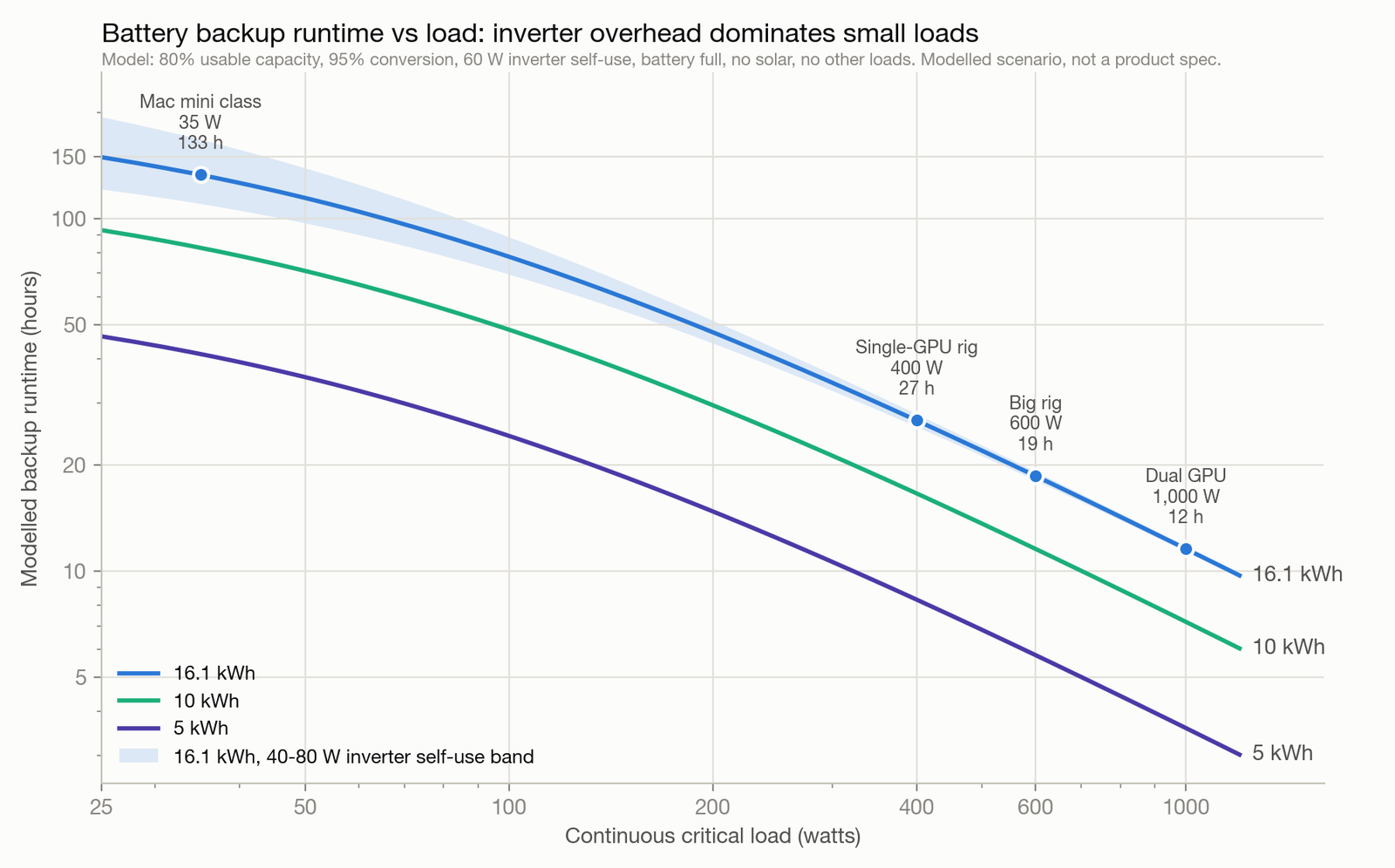
Notice the small-load end of the curve. At 35W, the inverter’s own 60W draw is the majority of the consumption: the overhead costs more than the computer. That is the counterintuitive result of the model, and it cuts the Mac mini runtime to a third of what nameplate arithmetic promises. Small always-on loads are exactly where a big inverter is least efficient, and it is a fair argument for keeping a small stack on a good UPS and skipping the battery entirely.
The switchover problem nobody publishes numbers for
Here is the uncomfortable finding from reading the primary documents instead of retailer copy.
- The official Sunsynk ECCO datasheet and installer manual state no transfer time at all. Not 20ms, not any figure. The commonly repeated “under 20ms” for Sunsynk traces to retailer and marketing copy, not to a document Sunsynk stands behind.
- GivEnergy’s own EPS configuration guide says, verbatim, that after loss of grid the EPS output energises after “approximately 5 seconds” in standard EPS mode. Five seconds reboots every computer in the house. Their sub-20ms “UPS mode” figure appears in marketing material, not in that document.
- Tesla’s Powerwall 3 UK datasheet gives no switchover figure either; Tesla’s support language is “a fraction of a second”.
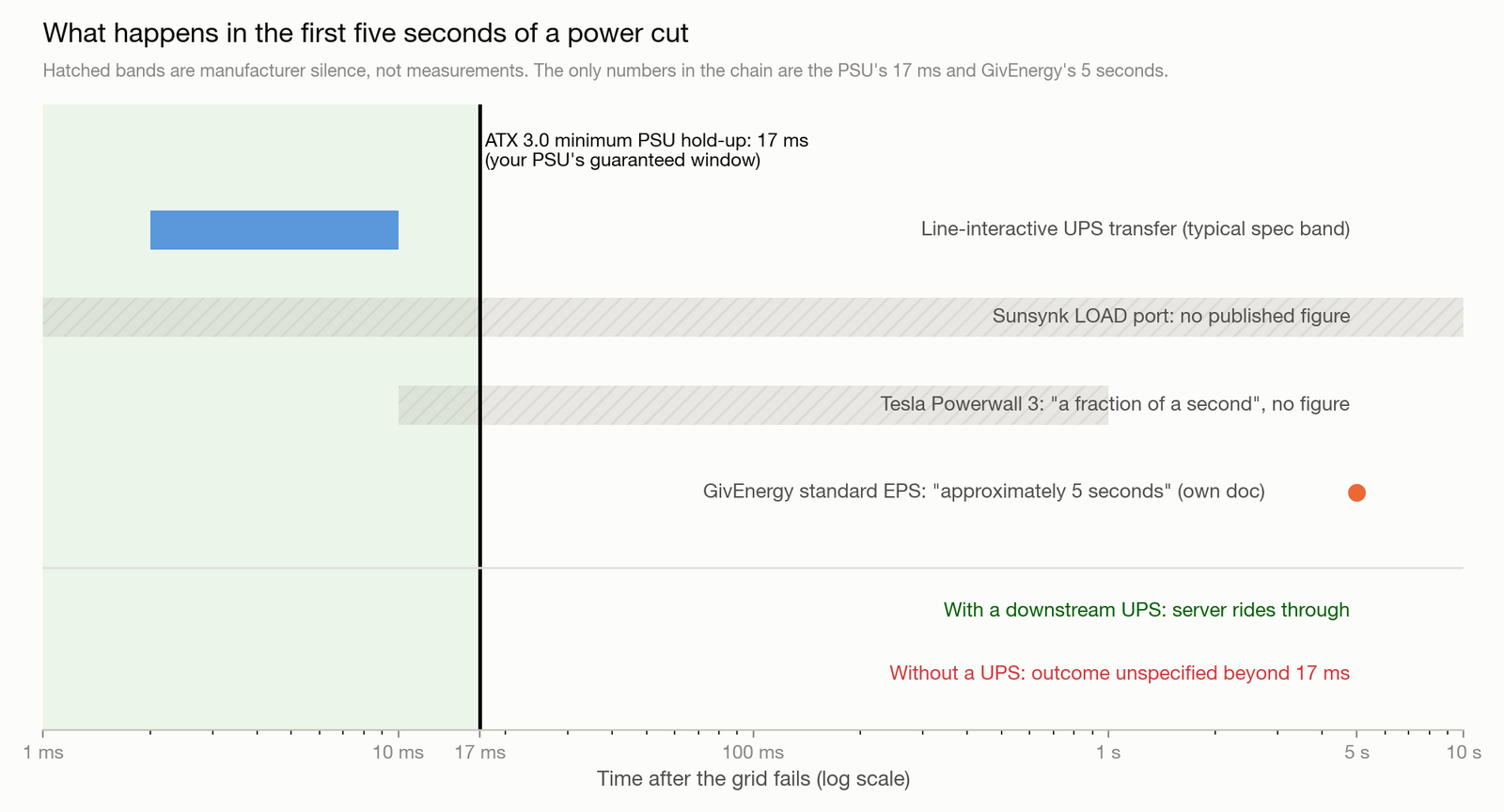
Set that against the one number that is specified: your PSU must survive 17ms (ATX 3.0, at maximum load; quality units do somewhat better, especially below full load). An unspecified transfer against a 17ms hold-up window is a gamble that mostly pays off, and “mostly” is not an engineering answer. In practice, Sunsynk owners routinely report equipment riding through cuts on the LOAD circuit. But nothing in the paperwork promises it, cold-start conditions and heavy load can change the behaviour, and the inverter can also drop the LOAD output for its own reasons: overload trips, BMS protection, firmware updates.
This is why the UPS stays in the design even after you have spent thousands on a battery. It converts an unspecified transition into a specified one. If you want real assurance about your own system, the credible test is empirical: put a power-quality logger or the UPS’s own event log on the circuit, kill the grid supply deliberately at representative load, and read what actually happened. That test is item three on the commissioning checklist at the end of this article, and it belongs on my list as much as yours.
The UK wiring reality: this is a designed installation
The LOAD-port circuit sounds like an accessory you bolt on. Electrically, it turns your house into a small power station that can run as an island when the grid fails, and UK practice treats it that way. You do not need to design any of this yourself; that is the electrician’s job. But knowing what the pieces are for is how you sanity-check a quote.
Here is the one piece worth understanding. The safety trips in your fuse box (RCDs) only work because your house has an earth connection, and in most UK homes that earth arrives through the grid supply. When the grid fails and the inverter keeps your essential circuits running on its own, that earth reference disappears with it. So a proper installation gives the house its own: typically an earth rod driven into the ground outside, plus a relay at the inverter that connects neutral to earth only while the grid is away. Get this wrong and the sockets still work during a cut, but the trips protecting you may not.
There is a second, quieter problem. Fuses and RCDs clear a fault by letting a large surge of current flow for a fraction of a second. The grid can supply that surge; a 3.6kW inverter cannot. Choosing protection that still trips fast on the inverter’s limited output is a genuine design decision, and it is the main reason this is not a copy-the-diagram job.
What you actually see at the end is modest: a second small consumer unit for the essential circuits, fed from the LOAD port, an earth rod, and a test certificate. The design work is invisible, which is exactly why it is worth paying for.
Separately, your electricity network operator (the DNO, the company that owns the cables in your street) has to know about anything that can push power into the grid. Small systems, up to 16A per phase (roughly 3.7kW), are simply notified after installation under a rule called G98. Bigger systems need advance approval under G99, which can take weeks. The catch people miss: the limit counts everything on the property together, so existing solar plus a new battery can cross the line even when each alone would not. Your installer files the paperwork; knowing the two names lets you check they did.
Two dated facts for anyone planning work in 2026: the wiring regulations changed on 15 April 2026 (BS 7671 Amendment 4, with a transition period running to 15 October 2026), so ask which edition your quote will be certified against. And a scale reminder: a 48V battery bank can push hundreds of amps into a fault, enough to weld metal. “DIY-friendly” here means you can source the parts and bolt the racks together yourself. The design, the connection and the certification belong to a professional. Budget for one.
My setup
My system is a Sunsynk 3.6 ECCO hybrid inverter with a Fogstar 16.1kWh LFP battery and around 7kWp of panels, monitored and automated through SolarAssistant.
The datasheet numbers that matter for this use case: the 3.6kW model is rated at 3,600W continuous output in backup (“Rated AC Output and UPS Power” in Sunsynk’s table), with off-grid peak capability of twice rated power for 10 seconds and 35A of grid passthrough when the grid is up. The 5kW sibling is the same architecture at 5,000W. Output distortion is specified under 3% THD, which is what “clean sine output” looks like when a datasheet says it properly.
Why Fogstar: LFP chemistry and price per kWh. The 16.1kWh Seplos-based unit sells for £1,949.99 at the time of writing, which is about £121 per kWh, a fraction of the installed-system price of the big brands. LFP has meaningfully lower thermal-runaway propensity and better thermal stability than the NMC chemistry in older wall batteries, which is why I am comfortable with it in the garage; that is a relative statement, not “cannot burn”, and it still deserves proper DC protection and a sensible location. Cycle-life figures of 6,000+ are test-bench numbers under defined conditions; treat “16 years” extrapolations as marketing arithmetic.
What a setup like this changes day to day is not drama, it is that a short cut stops being a shutdown event for whatever the LOAD circuit carries. The interesting question becomes runtime management, which is an automation problem: SolarAssistant exposes state of charge and per-port power locally, and Home Assistant can act on it, shedding noncritical load at a threshold or raising the backup reserve ahead of a forecast storm.
The running economics of a 24/7 compute box
The battery’s day job, the other 364 days, is tariff arbitrage, and a compute load is unusually good at using it because it is constant and schedulable.
Start with consumption. A box averaging 400W around the clock uses 9.6kWh a day, roughly 3,500kWh a year: more than an average UK household’s entire electricity consumption, plus 400W of continuous heat into the room (free in January, a cooling problem in July). Local AI at this scale is a material energy decision, not a rounding error.
What a kWh into that box costs depends on where it came from, and the marginal cost is not zero just because you have solar:
- Import at peak rate: 26.11p, the Ofgem cap for 1 July to 30 September 2026.
- Import overnight on a time-of-use tariff: 9.5p on standard Octopus Go between 00:30 and 05:30, which anyone can sign up for, or a varying half-hourly rate on Agile. Intelligent Octopus Go is cheaper again at 8p over a longer 23:30 to 05:30 window, but it needs a compatible EV or home charger, which an AI box does not give you. Rates checked 24 July 2026.
- Solar you would otherwise export: worth the export rate you gave up, 12p flat on Octopus Outgoing and less on a plain SEG tariff, not 0p.
- Energy shifted through the battery: the cheap rate divided by round-trip efficiency, plus a wear allowance per cycle.
Worked example, labelled as an estimate: run the 9.6kWh/day box entirely on battery charged overnight at standard Octopus Go’s 9.5p instead of importing at the 26.11p cap and the difference is about £1.59 a day, £580 a year, before efficiency losses and wear trim it. Both rates were checked on 24 July 2026, and the cap holds only to 30 September, so re-run it against your own two rates. Real numbers land lower because no battery arbitrages every kWh every day, and every kWh the server takes from the battery is a kWh the house cannot use at peak. The honest framing: a battery you already justified for the household makes 24/7 compute much cheaper to run; buying a battery solely to power a GPU is a resilience decision with an economic discount, not an investment. For the pure grid-charging case, the maths lives in Home Battery Without Solar.
Winter, and the multi-day outage
The single-number runtime table assumes the battery starts full and the outage is short. The stress case is a multi-day winter outage after a storm, when solar contributes least, and it is where an automation plan matters more than capacity.
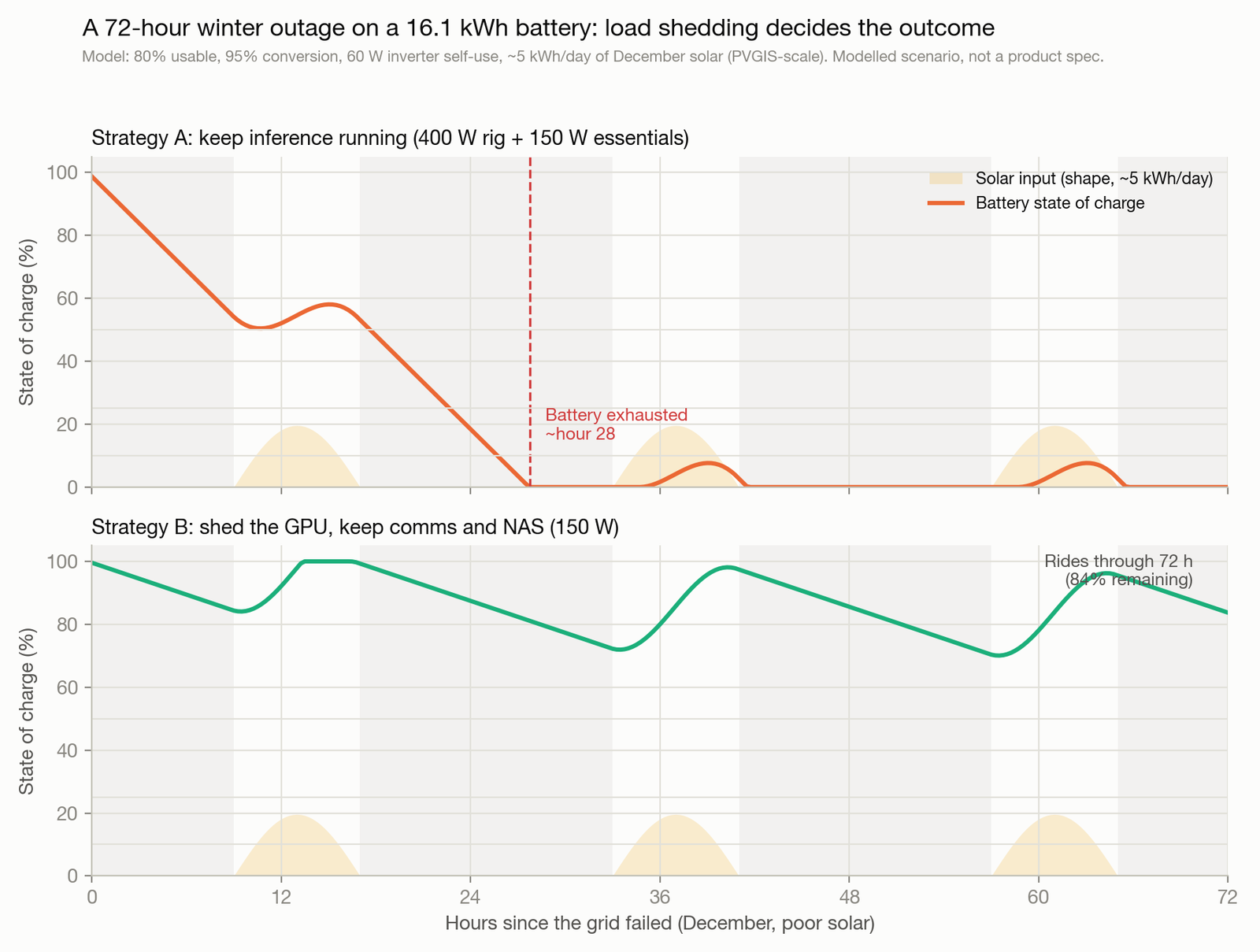
The model in the chart runs a 72-hour December outage against a 16.1kWh battery with a realistic poor-winter-day solar profile (a 4kWp-class array yielding around 5kWh per day, PVGIS-derived). Two strategies:
- Keep inference running (400W rig plus 150W of household essentials): the battery is exhausted during the second night even with the daytime solar top-up.
- Shed the GPU, keep comms and NAS (about 150W total): the battery rides through all three days with margin, because winter solar roughly covers a 150W baseline.
That is the real answer to “how long will it run”: as long as your load-shedding discipline says. The practical automation ladder, in order: monitor state of charge locally (SolarAssistant or Home Assistant, both on the backed-up circuit, no cloud dependency); raise the backup reserve when severe weather is forecast; pause noncritical inference at, say, 50% state of charge; trigger the staged UPS shutdown of everything but comms at 20%. Also understand your inverter’s black-start behaviour before you need it: whether PV can restart and charge the battery while islanded, and what the minimum state of charge for a restart is.
Which system, honestly
I have direct experience of one system and have researched the rest from primary documents; the table reflects that difference, and the superlatives you usually read (“fastest”, “most polished”) are exactly what the datasheets refuse to support.
| System | Architecture | Backup output | Published transfer behaviour | Rough cost (Jul 2026) | Evidence grade |
|---|---|---|---|---|---|
| Sunsynk ECCO + Fogstar | Hybrid inverter + third-party 48V LFP rack | LOAD port, 3.6-5kW continuous | None published | ~£3,000-3,600 in parts (inverter ~£800-1,290 observed range, battery £1,949.99), plus professional design and install | I own and run it |
| GivEnergy All-in-One | Integrated inverter + battery | EPS output | Standard EPS “approximately 5 seconds” (own documentation); faster-mode claims are marketing-sourced | ~£5,800-7,650 installed (installer quotes, estimate) | Primary docs only |
| Tesla Powerwall 3 | Integrated, 11.04kW continuous (datasheet) | Whole-home or partial backup via Gateway | “A fraction of a second” (Tesla support language); no datasheet figure | ~£7,000-12,000 installed (installer quotes, estimate) | Primary docs only |
A material fact before you shortlist GivEnergy: Companies House lists GivEnergy Ltd as in administration, with administrators appointed on 9 April 2026 (recorded in The Gazette). What that means for new-unit warranties, the cloud service and firmware support was not resolved at the time of writing. I am not going to speculate either way; check the current position before you buy, and weigh how much of the product’s value depends on a functioning cloud.
Portable power stations (EcoFlow, Bluetti and similar) are the no-electrician alternative: 1-3kWh, pure sine on the better units, and genuinely useful for a small stack. I have not tested one under inference load, so I will not rank them; verify the transfer time and waveform spec for the specific unit, because they vary widely.
And whichever way you go: the parts price of the DIY route is not comparable to the installed price of the turnkey routes until you add protection, cabling, the essential-loads consumer unit, earthing work, testing, certification and the DNO paperwork. The gap narrows; it does not close.
Commissioning checklist, then the next move
Before you trust the stack with an overnight agent run, test it the way you would test a backup that matters, because that is what it is:
- Measure the real critical load at the wall, idle and under sustained inference.
- Confirm UPS shutdown signalling end to end: pull the UPS’s input plug and watch the staged shutdown actually complete: GPU job, server, NAS, network.
- Test the LOAD-port transfer at representative load (grid isolator off, not a storm) and read the UPS event log: did it register a transfer, and how deep?
- Confirm automatic restart when power returns, unattended.
- Check winter behaviour: reserve setting, low-temperature charging limits if the battery lives in a cold garage, black-start.
- Re-run the plug-pull test quarterly. Backup systems rot quietly.
The next move depends on your load. Under about 150W of critical stack: buy a good pure-sine UPS with shutdown signalling this week and you have solved most of the problem for around £200. Above that, or if you want the rig computing through outages rather than surviving them: the UPS still comes first, and the battery layer is a professionally designed LOAD-port installation that also happens to cut your running costs every other day of the year. That second part is what makes the spreadsheet close.
