
You can add another solar battery when your existing system supports the proposed expansion. Matching the brand, voltage or advertised capacity is not enough. Check the exact battery, inverter, controller and installation requirements before ordering. Buying online can be part of the process, but the listing cannot assess your existing system.
This is about adding storage when you already have a home battery. The first decision is whether the extra unit belongs in that system. The second is whether you can use enough of its capacity to justify the installed cost.
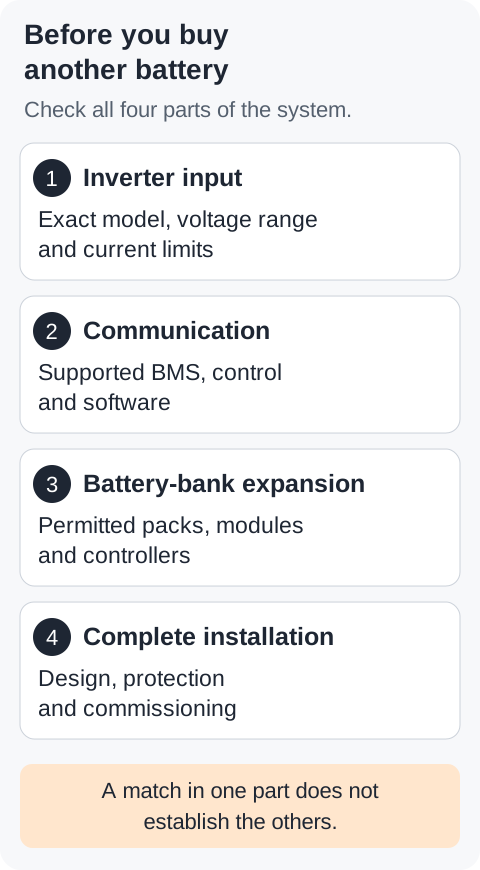
What are you actually adding?
An extra rack battery, another tower module and a second complete battery system are different purchases. Their installation and compatibility requirements differ too.
| Proposed addition | What needs checking |
|---|---|
| Another pack in the existing bank | The manufacturer permits that pack combination, control arrangement and total bank size. |
| Another module in a battery tower | The module, controller, tower size and inverter form a supported configuration. |
| Another complete battery system | The installer assesses how both systems operate together, including metering, export control and backup. |
Ask the manufacturer or responsible installer which route the product supports. A spare space in a rack or tower does not answer that question.
Will the new battery work with your inverter?
Start with the complete model numbers on your equipment records. Similar inverter names can describe different battery inputs and control systems.
The battery must suit the inverter’s specified operating voltage range and current limits. The manufacturers must also support the intended control arrangement. A label saying “48V” does not establish all those conditions.
Manufacturer compatibility lists help, but read what each list actually covers. Fogstar’s ESR51.2 support page lists inverter brands and protocols. It does not identify every inverter model, firmware version or possible battery-bank combination.
Sunsynk warns about unlisted third-party batteries that may communicate or perform incorrectly. A battery supplier’s support claim does not automatically establish approval from the inverter manufacturer.
I would ask for the exact combination in writing, including the required software and any controller or gateway. If the documents do not settle it, ask the manufacturers before buying.
What does BMS compatibility mean?
A battery management system, or BMS, monitors battery conditions and participates in protection. Its functions depend on the product. A supported control system can use battery information to restrict charging or discharging when necessary.
CAN and RS485 describe communication systems. They do not identify every message that a battery and inverter must exchange. Matching sockets, or matching the word “CAN” on two listings, does not prove that the equipment understands each other.
For example, Victron’s guidance for named Pylontech batteries specifies a GX device and software requirements. Those conditions belong to the listed equipment. They do not approve every battery that advertises a similar protocol.
There can also be a separate communication link between battery packs. An inverter communicating with one battery does not prove that an additional pack joins the bank correctly.
Some supported systems operate without a battery-to-inverter data link. That is different from removing battery protection. Fogstar discusses such arrangements in its Knowledge Hub. Leave that design decision with the installer and the applicable manufacturer instructions.
Does using the same cell chemistry make batteries compatible?
No. Lithium iron phosphate, often shortened to LFP or LiFePO4, describes the cell chemistry. It does not define the complete battery design.
The cell arrangement affects pack voltage. The monitoring, protection and operating limits must also suit the complete system. Two LFP products can therefore have different permitted uses.
BYD provides a useful example. Its legacy HVS and HVM systems both use LFP cells, but BYD prohibits mixing their modules. See the HVS/HVM service guideline, version 1.5. That document covers the named legacy systems; newer products need their own instructions.
Adding a complete approved module is also different from replacing individual cells inside an enclosure. Do not treat a loose cell as an expansion accessory. Victron’s Lithium NG safety instructions prohibit opening or dismantling the battery. Use the manufacturer’s service route for internal faults.
Can you mix battery ages, capacities or generations?
Sometimes, within a documented product family and configuration. There is no useful universal answer based only on age or capacity.
Victron’s Lithium Smart manual, section 4.5.6, permits different capacities and ages in parallel under its product rules. It gives different conditions for series strings. That permission does not extend to arbitrary battery brands or BMS products.
The connection method matters. Pylontech’s US5000 series manual, version 1.0, prohibits series connection for US5000 and US5000-B batteries. Adding their voltages on paper does not make that arrangement permissible.
The same product name can also hide different hardware generations. Fogstar lists separate BMS firmware for its rack generations. That distinction is a reason to check the exact equipment. It is not proof that those generations can, or cannot, share a bank.
Conversely, different controller generations are not always prohibited. BYD documents specific BCU and BCU-V2 arrangements in its BCU-V2.0 operating manual, section 6.2.3. The documented roles and complete system conditions still apply.
For a used battery, ask about its service history, faults and support eligibility as well as its model. A working display or a reported cycle count cannot establish every condition the installer needs to assess.
Will the BMS sort out differences between the packs?
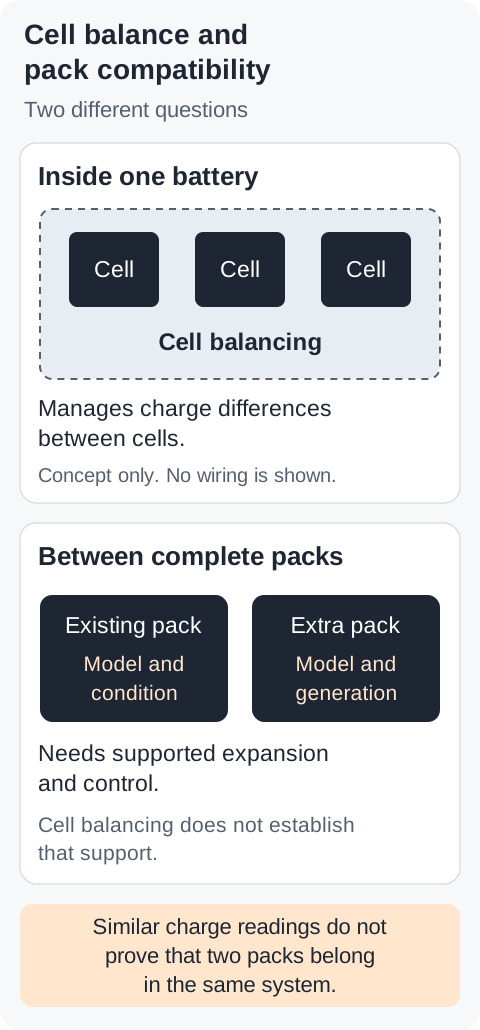
Do not buy on that assumption. Cell balancing and matching the charge levels of complete batteries are different questions.
Victron’s Lithium Smart manual distinguishes these in section 4.3.1. Cell-balancing circuits in one battery do not directly balance cells inside another. Follow the exact manufacturer expansion procedure rather than assuming the bank will correct any mismatch after connection.
My Fogstar rack has three packs with different use histories. I observed their displayed charge levels drift and later converge. That observation does not prove an automatic inter-pack balancing mechanism or establish compatibility for someone else’s equipment.
The installer may need to check charge levels, software and configuration during expansion. This is commissioning work. Do not copy a charge percentage from another battery’s manual or change protection settings to force an addition to work.
What else can change when you add storage?
More stored energy does not necessarily mean more power for your appliances. Capacity in kWh describes stored energy. Power in kW describes how quickly the system can supply it. The inverter, batteries and installation can each impose limits.
Ask the installer to assess the complete design, including protection, equipment ratings, location and commissioning. An existing installation does not automatically accommodate extra storage because there is room beside it.
For Great Britain, NGED distinguishes battery energy from registered inverter power. Extra battery capacity behind an unchanged inverter does not itself increase that power. The connection agreement can still require contact with the network operator.
Adding another battery inverter is a different change. Ask the installer to check the whole connection arrangement. Northern Ireland uses separate network documents, as recorded in the Utility Regulator’s approval.
Building-control requirements also depend on the nation and proposed work. Ask who will handle any required notification and certification. Get warranty responsibility in writing separately; technical compatibility alone does not settle the warranty.
What should you ask before placing an order?
Send the installer or manufacturer your equipment details and ask for a complete installed quote. Keep serial numbers and account details in private correspondence.
- The existing inverter, battery and controller model numbers, plus their known hardware and software versions.
- The exact model and revision of the proposed addition, and the intended final number of packs or modules.
- The manufacturer document or written confirmation that supports this particular expansion.
- Any required design, protection, controller, software or location changes, and who will commission them.
- The total installed cost, warranty responsibility, and who handles any required network or building-control process.
Use labels and documents you can access safely. Do not open battery enclosures or enter protected service menus to collect missing information.
A short message can make the request clear:
I want to add storage to my existing battery system. Please confirm the exact supported addition and any required changes. Include the manufacturer evidence, total installed cost, commissioning, warranty responsibility and required notifications in your quote.
Once the installer establishes a supported route, compare the additional usable capacity with your household demand. Look at when the battery empties and whether the extra capacity can recharge before you need it. Compare the extra saving with the full installation cost, rather than the battery listing alone.
Our battery sizing calculator provides an initial capacity estimate. It does not assess product compatibility or calculate the return from expanding an existing bank. Use it to frame the sizing discussion, then use your measured demand and the installer’s quote for the expansion decision.
Manufacturer examples apply only to the products and document versions cited. The product image is an AI-generated editorial illustration of disconnected equipment. It does not show an installed system.
